
DMZ
Configuration de la DMZ
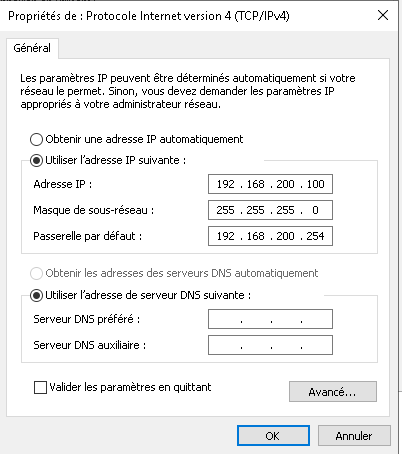
Adresses IP :
- DMZ :
192.168.200.100
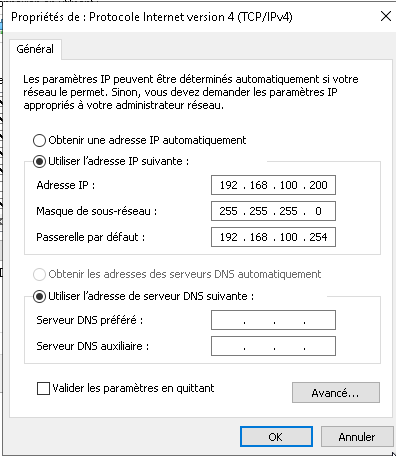
- LAN1 :
192.168.100.200
Port de la DMZ sur le pare-feu : port5
Règles à mettre en place sur le firewall pour la DMZ
1. LAN1 → DMZ
Autoriser les protocoles et services suivants :
- RDP (Remote Desktop Protocol) : Port 3389 (TCP)
- SSH (Secure Shell) : Port 22 (TCP)
- HTTPS : Port 443 (TCP)
- HTTP : Port 80 (TCP)
- Ping (ICMP) : Protocole ICMP (Echo Request/Reply)
2. DMZ → LAN1
Autoriser les protocoles et services suivants :
- RDP (Remote Desktop Protocol) : Port 3389 (TCP)
- SSH (Secure Shell) : Port 22 (TCP)
- HTTPS : Port 443 (TCP)
- HTTP : Port 80 (TCP)
- Ping (ICMP) : Protocole ICMP (Echo Request/Reply)
Règles supplémentaires à configurer sur le firewall
3. DMZ → WAN
Autoriser les protocoles et services suivants :
- HTTP/HTTPS : Ports
80et443(TCP). - Ping : Protocole ICMP (Echo Request/Reply).
4. WAN → DMZ
Autoriser les protocoles et services suivants (uniquement si nécessaire) :
- HTTP/HTTPS : Ports
80et443(TCP). - Ping : Protocole ICMP (Echo Request/Reply).